Why Your Content Calendar Lies to You
It's Wednesday afternoon. Your Growth team is ready to launch a flash sale tomorrow—creative is done, landing page is live, emails are scheduled.
Then someone from the Brand team walks by: "Hey, isn't tomorrow our 3-year anniversary? We've had that campaign planned for months."
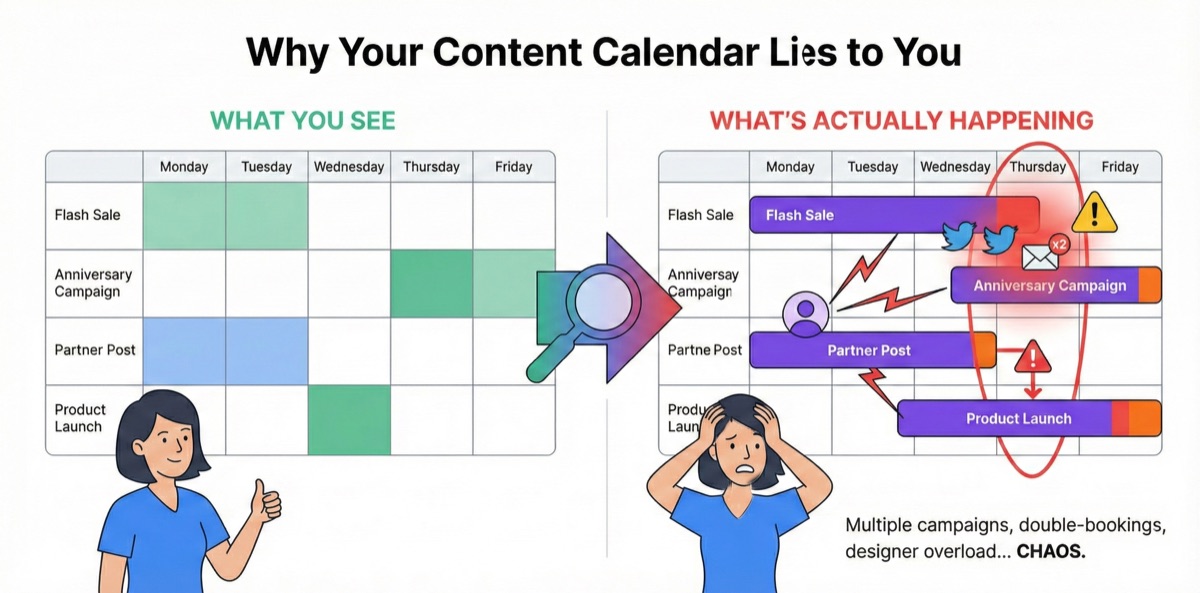
You check the marketing calendar. Thursday shows the anniversary campaign. But it also shows the flash sale. Both are scheduled for the same Twitter account, the same email list, the same homepage banner slot.
How did nobody catch this?
Because your content calendar is a spreadsheet. It shows dates. It shows campaign names. It doesn't show that two campaigns are fighting for the same channel on the same day. The conflict was invisible until right now—when it's too late to fix without someone losing.
The Spreadsheet Illusion
Most marketing teams track their content calendar in Google Sheets. It looks organized—rows of campaigns, columns for dates, color-coded by status.
But spreadsheets don't show you:
- Channel conflicts: Two campaigns scheduled for the same Twitter account, email list, or homepage slot on the same day
- Content collisions: A product announcement competing with a brand campaign for audience attention
- Cross-team blind spots: Growth doesn't see what Brand has planned; Brand doesn't see what Product Marketing is doing
You see dates. You see campaign names. You don't see that three teams are about to post to the same social account on the same afternoon.
Why Marketing Misses Hurt More
Here's something that took us years to fully appreciate: missing a marketing window is often worse than missing a development deadline.
When engineering misses a sprint, you can usually:
- Push to the next sprint
- Ship a smaller scope first
- Do a phased rollout
The work waits for you. It's not ideal, but it's recoverable.
When marketing misses a window, the window closes:
-
Black Friday creative delayed 3 days? You just lost the highest-converting shopping weekend of the year. There's no "Black Friday next sprint."
-
Product launch assets not ready? The press embargo lifts anyway. Journalists write about your competitor instead. That PR moment doesn't come back.
-
Influencer content missed the posting window? The contract specified November 15th because that's when their audience engagement peaks. Post on November 22nd and you've paid full price for half the impact.
-
Seasonal campaign pushed to "next week"? Valentine's Day doesn't move. Your heart-themed creative is worthless on February 15th.
We learned this the hard way. One team we worked with had $200K in ad budget allocated for a two-week product launch window. The campaign got bumped because another team's "urgent" initiative took over the homepage and email channels for the first week. By the time they launched, they could only spend $80K before the window closed. $120K returned to finance. The campaign hit 40% of its target.
The engineering equivalent would be like code that expires—imagine if your feature simply stopped working if you didn't ship it by a certain date. That's marketing.
Real Stories from the Collision Zone
The anniversary disaster we opened with? That's just one flavor. Here are the others we see constantly:
The Product Launch Pileup
Product Marketing scheduled a major feature announcement for Tuesday. What they didn't know: the Partner team had a co-marketing campaign going live the same day, and Content was publishing a thought leadership piece they'd been promoting for weeks.
Three campaigns, all hitting the same LinkedIn company page, same email newsletter, same blog homepage on the same Tuesday.
Result: Each campaign cannibalized the others. Feature announcement got buried. Partner was upset their campaign didn't get visibility. The thought leadership piece that took six weeks to produce got 40% of expected engagement.
The Email Fatigue Incident
Customer Marketing sent a re-engagement campaign on Monday. Product sent a feature update email on Tuesday. Growth sent a promotional offer on Wednesday. Three emails in three days—from the same company, to the same customers.
Result: Unsubscribe rate spiked 300% that week. Customer Success started getting complaints: "Why are you spamming me?"
Nobody planned to spam customers. Each team thought they were the only one emailing that week.
The Influencer Content Clash
Two campaign managers booked the same influencer for posts in the same week—one for a product launch, one for a seasonal promotion. Neither knew about the other because they tracked influencer schedules in separate spreadsheets.
Result: The influencer couldn't do both (audience fatigue). One campaign lost their slot. Contract was already signed. Money wasted.
And If You're Global? Multiply Everything.
Now imagine this across multiple countries. Multiple brand lines. A regional team in APAC scheduling campaigns while the US team is asleep. A sub-brand running promotions that conflict with the parent brand's messaging.
One global consumer electronics company we talked to had 12 regional marketing teams, 4 product lines, and a shared social media presence. Their "content calendar" was actually 30+ spreadsheets across different time zones, different languages, different owners. Conflicts weren't discovered until customers complained: "Why did you post three times today?" or "Your two accounts are saying contradictory things."
When your marketing org spans countries and brand lines, the collision problem isn't 2x worse. It's exponentially worse.
These aren't just scheduling problems. They're visibility problems. Everyone has their own calendar. Nobody sees the whole picture. And by the time you discover a conflict, it's already a crisis.
What You Actually Need to See
A real content calendar doesn't just show dates. It shows collisions before they happen.
Channel allocation across all teams. Not just "what campaigns are running"—but which channels each campaign is using, and when. When two campaigns are scheduled for the same Twitter account on the same day, you should see that conflict at planning time, not the day before launch.
Cross-team visibility. Growth sees what Brand has planned. Brand sees what Product Marketing is doing. Partner team sees what's already scheduled for the week they want to launch. No more "I didn't know you were doing that."
Email frequency guardrails. How many emails are going to the same audience this week? When Customer Marketing, Product, and Growth are all planning sends, someone needs to see the full picture before you trigger an unsubscribe wave.
Content collision warnings. "Two campaigns are targeting the same audience segment on the same day." "Homepage banner is already booked for Thursday." "This influencer is already committed to another campaign this week."
The Content Calendar That Connects to Reality
BloomSig's Content Calendar isn't a separate tool you have to keep in sync. It's connected directly to your Jira campaigns—so when work moves, the calendar updates. And everyone sees the same picture.
All campaigns, all teams, one view. Growth's flash sale. Brand's anniversary campaign. Partner's co-marketing push. Product's feature announcement. All visible on the same timeline. When you schedule a campaign for Thursday, you immediately see what else is happening Thursday—across every team.
Channel conflicts surface automatically. Try to schedule two campaigns for the same Twitter account on the same day, and you'll see a warning: "Twitter is already booked for Anniversary Campaign on Dec 15." You can still proceed if it makes sense—but you're making an informed decision, not discovering the conflict the day before launch.
Email frequency tracking. See how many emails are going to each audience segment each week. When Customer Marketing, Product, and Growth are all planning sends, BloomSig shows you: "This audience will receive 3 emails this week. Average unsubscribe rate increases 40% above 2 emails/week." Make the tradeoff consciously.
"What if" planning that actually works. Drag a campaign to a different week. Instantly see which conflicts resolve and which new ones appear. "If we move Flash Sale to next Tuesday... oh, that conflicts with the Partner launch. What about Wednesday?" Answer in seconds, not hours of spreadsheet updates.
The Difference in Practice
Before: Each team has their own content calendar. Growth schedules in their spreadsheet. Brand schedules in theirs. Partner team uses Asana. Nobody sees the full picture. Conflicts discovered the day before launch—when someone has to lose. Fire drills. Rushed rescheduling. Cannibalized campaigns. Frustrated partners.
After: Everyone sees the same calendar. When Growth schedules a flash sale for Thursday, they immediately see Brand's anniversary campaign is already there. The conversation happens at planning time—"Hey, can we do flash sale Wednesday instead?"—not Wednesday afternoon when everything is already locked.
What the CMO Sees
For marketing leadership, content collision chaos shows up as:
- "Why did three teams email our customers in the same week?"
- "Why did our big announcement get buried by another campaign?"
- "Why are our partners upset about lack of visibility?"
When everyone works from the same calendar with channel allocation built in, these questions have answers:
- You can see all marketing activity across all channels, all teams
- You can identify over-saturated periods before they happen
- You can protect key campaigns from being cannibalized
- You can commit to partners and stakeholders with confidence
One marketing ops leader told us: "We used to have a weekly meeting just to deconflict schedules. Now we just look at the calendar. That meeting is gone."
Getting Started
Content Calendar is part of BloomSig, coming soon to the Atlassian Marketplace. It works best when combined with Campaign Launcher—campaigns created from templates automatically populate the calendar with channel assignments and dependencies.
Start by asking yourself: Do you know what every team in marketing has planned for next week? Which channels are they using? When are they sending emails?
If the answer is "I'd have to check five different spreadsheets"—you probably have collisions coming that you don't know about yet.
Want to see your content conflicts before they derail your next launch? Join the early access waitlist →
This is Part 6 of our series on marketing operations in Jira. Start from the beginning →
This article is part of