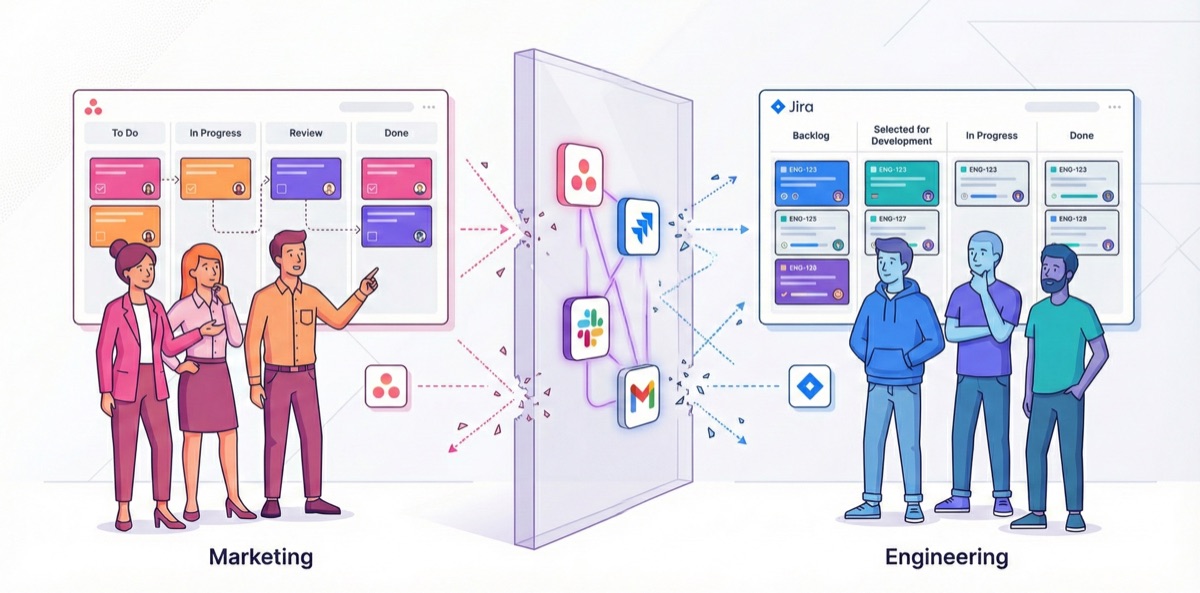
Campaign Launch Day: A Horror Story
It's Tuesday, 9 AM. Sarah, your campaign manager, has been preparing the Q1 product launch for six weeks. Landing page copy is approved. Creative assets are final. Ads are scheduled. Everything is ready.
Except the landing page doesn't exist yet.
Chapter 1: The Request
Three weeks ago, Sarah submitted a request for engineering support. She did everything right:
- Created a detailed brief in Asana (where Marketing works)
- Specified all requirements, mockups, and deadlines
- Tagged it as "High Priority"
- Sent a Slack message to the engineering lead
The engineering lead, Mike, responded: "Looks good! Can you create a Jira ticket so we can track it?"
Chapter 2: The Translation
Sarah doesn't have a Jira account—even though the company already pays for Jira across every other department. She requests access, waits for IT approval, and spends 45 minutes figuring out how to create a ticket. The interface is full of unfamiliar terms: "story points," "epics," "sprints." None of this maps to how she thinks about campaign work.
She copies her requirements from Asana to Jira. Not a link—the full text, because "engineers won't check Asana."
Now the same information exists in two places. The company is paying for two project management systems. And they're already out of sync.
Chapter 3: The Prioritization
The following Monday, Mike's team has their weekly planning meeting—a room full of engineers and the product manager, deciding what to build in the next two-week cycle. Marketing isn't invited. Sarah doesn't even know this meeting is happening.
Sarah's ticket is in the queue, but it's competing with 47 other requests. Product features, bug fixes, technical improvements. The team picks what fits their capacity. Sarah's landing page doesn't make the cut.
Sarah doesn't know this. Her Asana task still says "Submitted to Engineering." Nobody updated it—why would they? The engineer who might work on it doesn't use Asana.
She finds out on Thursday—four days later—when she messages Mike: "Hey, just checking on the landing page status?"
Mike: "Oh, that didn't make this sprint. We can look at it in two weeks."
Sarah: "The campaign launches in 10 days."
Mike: "I didn't see a deadline on the ticket."
Sarah: "It was in the Asana brief."
Chapter 4: The Scramble
What follows is a week of:
- Emergency meetings
- Scope negotiations
- A weekend of overtime for one developer
- A landing page that's "good enough" instead of "great"
- A campaign that launches on time but underperforms expectations
Total cost of this miscommunication:
- 4 hours of meetings
- 16 hours of rushed development (with overtime premium)
- Estimated 15% lower conversion rate due to compromised page quality
- One frustrated campaign manager
- One frustrated engineering lead
- And a pattern that will repeat next quarter
The Pattern
We've lived this story ourselves—and watched it repeat across every marketing team we've worked with. Startups with 10 people. Enterprises with 10,000. The scale changes; the pattern doesn't.
This isn't a story about bad people. Sarah is excellent at her job. Mike runs a great engineering team. The problem is structural:
- Information lives in silos: Requirements in Asana, work in Jira, communication in Slack
- No shared visibility: Neither team can see the other's priorities and workload
- Manual handoffs fail: Copy-paste between systems loses context and creates drift
- Urgency doesn't translate: "High Priority" in Marketing means nothing to Engineering's prioritization system
And here's what the CMO sees: Campaigns keep missing deadlines. The marketing team blames engineering. Engineering says they never got clear requirements. Everyone is frustrated, but nobody can point to exactly where things broke down—because the breakdown happened in the gap between two systems that don't talk to each other.
The CMO can't fix what they can't see. And when marketing work lives in a different system than engineering work, the handoff is invisible.
What "Integration" Doesn't Solve
"But wait," you might say. "Can't we just connect Asana to Jira? There are tools for that—Zapier, Unito, built-in connectors..."
We tried them all. Here's what we found:
Auto-sync creates duplicate tickets everywhere. Set up a rule to automatically create Jira tickets from Asana tasks, and you end up with outdated copies, duplicates, and a mess that someone has to clean up manually.
Two-way sync causes conflicts. If Sarah updates the Asana task while Mike updates the Jira ticket, which version wins? Now you need rules to resolve conflicts—and someone to maintain those rules.
Statuses don't translate cleanly. "In Progress" in Asana doesn't mean the same thing as "In Development" in Jira. Your integration shows green lights while reality is red. Now you're debugging your automation instead of shipping campaigns.
A Better Question
Instead of asking "how do we connect these tools?", we started asking: "what if we didn't need two tools?"
What if marketing could work in the same system as engineering—but with workflows designed for how marketers actually work?
Not "force marketing to learn Jira" (we've tried that; it doesn't work). But marketing-friendly workflows that run on the same platform your whole company already uses and pays for.
Campaign templates that automatically create all the tasks you need—including engineering requests with proper deadlines. Creative review workflows that don't require forwarding email chains. Calendars that show your campaign timeline right next to engineering's schedule, so conflicts are visible before they become crises.
That's what we're building with BloomSig. In the next post, we'll show you what this actually looks like.
Want to see BloomSig in action? Join the early access waitlist →
This is Part 2 of our series on marketing operations in Jira. Read Part 3: Marketing Workflows, Native to Jira →
This article is part of